Small Room: The Handwritten Font That Feels Like Home
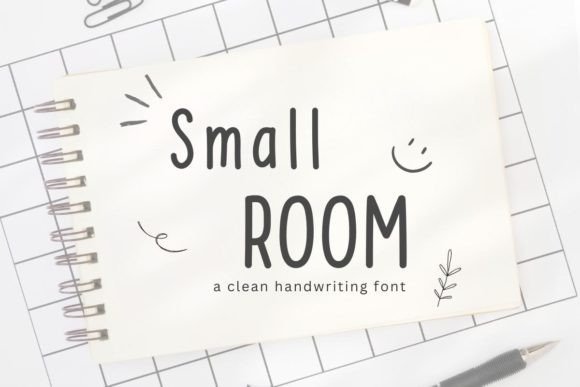
There’s something quietly powerful about handwriting — the gentle slope of letters, the subtle variation in line weight, the human rhythm behind each curve. Small Room captures that warmth without sacrificing clarity or versatility. It’s not a script meant for showy flourishes or dramatic swashes. Instead, Small Room is a simple, neat handwritten font designed with intention: to feel personal, approachable, and effortlessly usable across digital and print contexts.
What Makes Small Room Stand Out?
At first glance, Small Room appears unassuming — and that’s by design. Its charm lies in its authenticity. Each character mimics natural pen-on-paper movement: slight irregularities in baseline alignment, soft entry and exit strokes, and consistent yet organic spacing. Unlike overly stylized handwritten fonts, Small Room avoids visual noise. It reads clearly at small sizes and retains personality at larger ones — a rare balance.
It’s also deliberately lightweight in both file size and visual impact. No extra ligatures, no alternate glyphs cluttering your workflow. Just one clean, cohesive set of uppercase and lowercase letters, numerals, and standard punctuation. This simplicity makes Small Room fast to load, easy to install, and intuitive to use — whether you’re typing a quick note or designing a full branding suite.
Where Does Small Room Shine? Real Uses, Real People
Small Room isn’t just another font in your library — it’s a tool that adapts to how people actually work and create. Here’s where users consistently find it indispensable:
- Digital note-taking: Whether in GoodNotes, Notability, or Obsidian, Small Room transforms typed notes into something that feels handwritten — reducing cognitive friction and supporting retention.
- Procreate & iPad design: Artists and planners love layering Small Room over sketches or watercolor backgrounds. Its even texture holds up beautifully on textured brushes and low-opacity layers.
- Digital planners and habit trackers: Because it’s legible at 10–12pt and doesn’t compete with icons or checkboxes, Small Room adds warmth without sacrificing function.
- Blog posts and social graphics: Pair it with a clean sans-serif for headings, and Small Room becomes the perfect voice for pull quotes, captions, or friendly callouts — especially in wellness, education, or lifestyle content.
- Invitations and greeting cards: From baby announcements to wedding RSVPs, Small Room conveys sincerity without formality. It says “I made this for you,” not “I ran it through a template.”
- Branding for small businesses: Coaches, therapists, ceramicists, and independent educators often choose Small Room for logos or website subheads — it signals care, accessibility, and grounded professionalism.
Who Benefits Most from Small Room?
The answer is broader than you might expect. While creatives naturally gravitate toward expressive type, Small Room serves practical needs across roles:
- Online educators use it in course PDFs and slide decks to soften academic tone and increase student engagement.
- Remote professionals apply it in internal documentation and team dashboards to add humanity to otherwise sterile interfaces.
- Content creators rely on it for Instagram story text overlays — it scales well on mobile screens and maintains readability even over busy backgrounds.
- Small business owners appreciate how quickly Small Room helps unify their brand voice — from Canva social posts to printed thank-you cards — without hiring a designer.
- Students and lifelong learners report higher focus and recall when using Small Room in digital notebooks — likely due to its resemblance to familiar handwriting patterns.
Strengths You Can Count On
What truly sets Small Room apart isn’t novelty — it’s reliability. Users consistently highlight these strengths:
- Legibility-first design: Even at 9pt in a dense planner grid, letters remain distinct — no confusing l, I, or 1.
- Cross-platform compatibility: Works natively in Procreate, Affinity apps, Figma, Google Docs (via add-ons), and most desktop design tools — no rendering hiccups or missing characters.
- Emotional resonance: It invites trust. Medical practitioners use it in patient handouts; nonprofits use it in donor updates — because it feels honest, not polished.
- Low learning curve: No tutorials needed. Install once, select, and start typing — just like handwriting, but faster.
Things to Keep in Mind
Like any thoughtful tool, Small Room excels within its scope — and knowing its boundaries helps you use it more effectively:
It’s not a display font for bold headlines demanding attention. If your project calls for high-impact, decorative typography (think festival posters or luxury packaging), Small Room may feel too quiet. Likewise, it lacks stylistic alternates or multilingual support beyond basic Latin characters — so it’s best suited for English-dominant projects or those with limited language requirements.
Also, while its simplicity is a strength, it means Small Room won’t automatically solve layout challenges. Pairing it wisely matters: avoid stacking it with other handwritten fonts, and give it breathing room — generous line height and ample margins help it shine.
How to Know If Small Room Is Right for Your Project
Ask yourself three questions before adding Small Room to your next file:
- Does this need to feel human, not corporate? If warmth, approachability, or intimacy matters more than authority or prestige, Small Room fits.
- Will it be read — not just seen? If legibility at smaller sizes or on-screen clarity is essential (e.g., digital planners, blog sidebars), Small Room delivers.
- Do you value speed and consistency? If you want to design faster — without toggling between weights, styles, or language sets — Small Room streamlines your process.
If two or more answers are “yes,” it’s worth trying. And because Small Room integrates so smoothly into everyday workflows, testing it rarely requires major adjustments — just open your notes app or design file and type a sentence. Notice how it lands. Does it feel like a natural extension of your voice? That’s often the best signal.
A Font That Grows With You
Fonts come and go — but Small Room endures because it meets people where they are: in quiet moments of planning, teaching, creating, or connecting. It doesn’t shout. It doesn’t distract. It simply supports — with grace, consistency, and quiet confidence.
Whether you're sketching ideas in Procreate, drafting a heartfelt client email, laying out a printable gratitude journal, or designing your first logo, Small Room offers a rare combination: the comfort of handwriting with the precision of digital tools. It reminds us that good design isn’t about complexity — it’s about removing barriers between intention and expression.
So if your work involves words — whether shared publicly or kept privately — consider how Small Room might make them feel a little more like *yours*.