Handy Note: A Cute Handwritten Font for Real Life
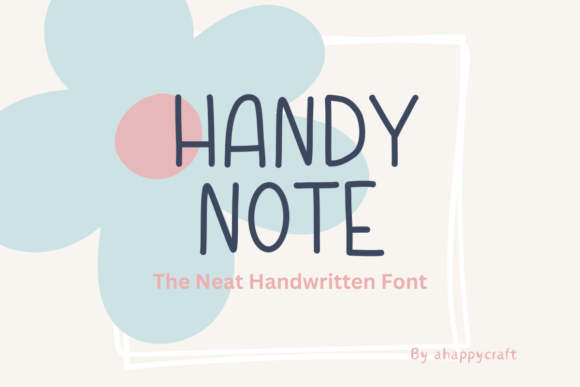
If you've ever scrolled through font libraries looking for something that feels personal—not stiff, not overly polished, but warmly human—Handy Note might be exactly what you’ve been missing. It’s a modern handmade font designed with a light, flowing line style that mimics natural handwriting. Each letter is intentionally unique: no two 'a's look identical, and even repeated letters in a word carry subtle variations, just like real pen-on-paper writing.
Why This Font Feels Different
Most freehand fonts aim for consistency—but Handy Note leans into imperfection. That’s its strength. The slight wobbles, gentle curves, and organic spacing make it feel approachable and expressive, not robotic or generic. It includes the full English alphabet (uppercase and lowercase), numerals 0–9, common punctuation, and basic symbols—so you won’t hit a wall mid-project because a question mark or ampersand is missing.
It’s also lightweight and legible at small sizes—ideal for digital planners where clarity matters—and retains charm even when scaled up for posters or apparel. Unlike some handwritten fonts that blur or lose character when resized, Handy Note holds its personality across formats.
Where Handy Note Fits Naturally
You don’t need design experience to get value from this font. In fact, its simplicity makes it especially friendly for beginners who want to add warmth without overcomplicating things.
- Digital planning: Use Handy Note for weekly habit trackers, goal lists, or journal headers in Notion, GoodNotes, or iPad apps. Its relaxed rhythm helps your planner feel inviting—not like another task to check off.
- Study & learning: Students and educators use it to highlight key concepts, label diagrams, or create flashcards that stand out visually without overwhelming the eye.
- Creative side projects: Think greeting cards, scrapbook titles, quote prints, or custom stickers. Because each letter has its own shape, even short phrases gain visual interest.
- Small business touches: A café owner might use it on a chalkboard-style menu; a freelance writer could apply it to newsletter headers or ebook chapter titles. It adds friendliness without sacrificing professionalism.
- Wearables & gifts: Print “Hello Sunshine” or your favorite quote in Handy Note on a t-shirt, tote bag, or ceramic mug—it reads as cheerful and intentional, never mass-produced.
Real-Life Uses You Can Try Today
Here are a few low-effort, high-impact ways people are already using Handy Note:
- Create a printable weekly reflection sheet—just type prompts like “What made me pause today?” or “One small win:” in Handy Note, then print or paste into your note app.
- Design a minimalist birthday card in Canva: layer a soft background color with a single line of text in Handy Note (“Happy Birthday, Friend!”) — no extra graphics needed.
- Add visual variety to your social media captions: swap one key phrase—like “Grab your coffee ☕” or “Let’s begin”—into Handy Note before exporting your Instagram story graphic.
- Use it for classroom handouts: students respond better to materials that feel less formal. A spelling quiz header or reading log title in Handy Note signals care, not cold efficiency.
What to Keep in Mind Before You Use It
Like any tool, Handy Note shines brightest when matched to the right job. It’s not meant for long paragraphs or body copy—its charm lies in short bursts of expression. For readability in extended text, pair it with a clean sans-serif (like Inter or Open Sans) as a supporting font.
Also, while it supports English fully, it doesn’t include extended Latin characters (like accented letters used in French or Spanish) or non-Latin scripts. If your project involves multilingual content, double-check coverage before committing to full layouts.
And though it’s free to download and use for personal and commercial work (always verify the current license), avoid embedding it directly into websites via @font-face unless you confirm web licensing—some platforms require a hosted version or alternative delivery method.
A Font That Grows With You
What makes Handy Note especially useful over time is how easily it adapts to changing needs. You might start by using it for a simple study planner, then later apply it to client presentation slides, then repurpose those same letterforms into a logo concept or product label. Its handmade quality gives flexibility—you’re not locked into a rigid brand voice, but invited to explore tone, mood, and intentionality.
It also pairs well with analog tools. Try printing a Handy Note heading, then adding hand-drawn arrows, watercolor splashes, or washi tape borders around it. The font doesn’t compete with your own mark-making—it invites collaboration between digital and physical.
Getting Started Is Simple
No special software is required. Handy Note works in everyday apps: Microsoft Word, Google Docs (via upload), Apple Pages, Adobe Express, Figma, Procreate, and most design or note-taking tools that accept OTF or TTF files. Installation takes seconds—just double-click the file and click “Install.” Then select it from your font menu like any other typeface.
For best results, try using it in medium weight (if available) for headings and light weight for secondary text. Avoid stretching or skewing the letters—they’re designed to shine at their natural proportions.
If you're new to typography, think of Handy Note as your go-to “friendly voice” font—like choosing a warm tone of voice in conversation. It doesn’t shout. It connects. And sometimes, that’s exactly what your next project needs.