Holligate: A Handwritten Font That Supports Intentional Design Decisions
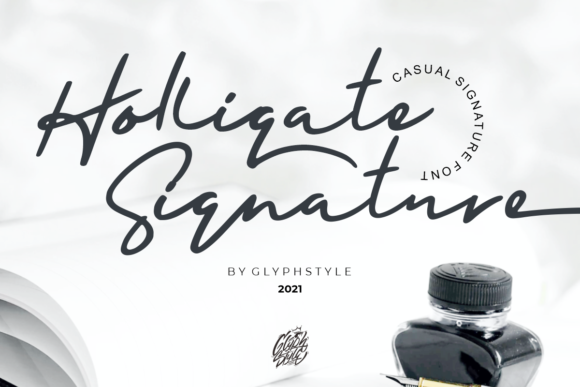
When you choose a font, you’re not just selecting letters—you’re choosing a tone, a rhythm, and a quiet signal about how seriously you take clarity, authenticity, and audience connection. Holligate is a casual, flowing handwritten font designed for people who value simplicity without sacrificing expressiveness. It’s not flashy or performative. Instead, it offers consistent warmth, legibility at moderate sizes, and natural variation that feels human—not algorithmic. For creators and professionals who make decisions daily about how their work is perceived, Holligate isn’t just another typeface. It’s a tool that rewards intentionality.
Why Holligate Fits Real-World Creative Strategy
Most handwritten fonts fall into one of two categories: overly decorative (hard to read beyond a headline) or too rigid (losing the organic feel that makes handwriting compelling). Holligate avoids both pitfalls. Its strokes have gentle contrast, its spacing breathes without gaps, and its lowercase forms carry subtle personality—without demanding attention. That balance makes it unusually versatile in strategic contexts where tone matters as much as function.
Consider this: a small business owner designing a workshop handout wants participants to feel invited—not instructed. A freelance educator building a course landing page needs warmth to offset technical content. A marketer launching a seasonal email campaign seeks visual continuity with a brand voice that’s friendly but grounded. In each case, Holligate supports the goal—not by drawing focus to itself, but by reinforcing an emotional baseline: approachable, thoughtful, unhurried.
PUA Encoding Means Control—Not Just Convenience
Holligate is PUA encoded. That technical detail matters more than it sounds. PUA (Private Use Area) encoding lets you access every alternate glyph, swash, and ligature directly from your keyboard—no complex font managers or character map digging required. But here’s the strategic insight: access doesn’t equal obligation. Having 42 swashes doesn’t mean you need to use them all. It means you can choose deliberately—a single flourished “Q” to open a quote, a connected “&” in a tagline, or a simplified version for body text in a printable guide.
This level of control supports better decision-making. You’re not stuck with default behavior. You can test variations quickly, align typographic choices with content hierarchy, and maintain consistency across formats—print, web, social graphics—without switching fonts or compromising voice.
Where Holligate Adds Value—And Where It Doesn’t
Strategic typography isn’t about finding the “best” font. It’s about matching form to function, audience, and outcome. Holligate excels in specific, high-impact scenarios:
- Craft-based branding: Etsy sellers, stationery designers, and handmade goods businesses use Holligate to reinforce authenticity—especially when paired with tactile materials like kraft paper or linen textures.
- Educational resources: Lesson plans, worksheets, and reflection journals benefit from its readability and gentle rhythm, reducing cognitive load for learners without infantilizing the content.
- Customer-facing printables: Welcome guides, onboarding checklists, and service menus gain quiet authority when set in Holligate—it signals care in presentation, not just content.
- Editorial accents: Blog headers, pull quotes, and chapter titles gain distinction without shouting, especially when layered over clean sans-serif body text.
But Holligate isn’t ideal for everything. Avoid it for dense UI interfaces, legal disclaimers requiring strict legibility at small sizes, or multilingual documents with extensive diacritics unless you’ve verified full language support. It also loses effectiveness when overused—such as setting entire websites or long-form reports in it. Its strength lies in contrast and restraint, not dominance.
Using Holligate With Purpose—Not Habit
Many designers reach for handwritten fonts reflexively—“it feels personal” or “it matches the vibe.” That’s fine for mood boards. But for real-world execution, ask three questions before applying Holligate:
- What action do I want the reader to take? If the goal is quick scanning (e.g., event logistics), Holligate works best in headings only—not body copy.
- What’s the context of use? A printed recipe card benefits from Holligate’s warmth; the same font on a mobile menu bar may hinder usability.
- Does this choice serve the audience—or my aesthetic preference? Test with actual users. Does a client find the invoice header more trustworthy? Do students navigate the syllabus more confidently? Let evidence—not instinct—guide the decision.
One practical planning tip: build a Holligate usage guide early. Define exactly where it appears (e.g., “H1 only on blog posts,” “swash capitals reserved for cover art”), what size ranges are approved, and which pairings are tested and trusted (e.g., Holligate + Inter for digital, Holligate + Merriweather for print). This prevents drift and ensures scalability—critical for freelancers managing multiple clients or small teams growing their brand assets.
Risks of Using Holligate Without Context
The biggest risk isn’t technical—it’s strategic ambiguity. When Holligate is applied without clear goals, it can unintentionally dilute professionalism or confuse messaging. A law firm using it for client contracts may signal informality where precision is expected. A tech startup deploying it across dashboard labels might sacrifice scanability for charm. And hobbyists sometimes overuse swashes, turning clarity into decoration.
More subtly, inconsistent application erodes trust. If one email uses Holligate for headlines and the next uses it for bullet points—and the third abandons it entirely—the brand feels reactive, not intentional. That inconsistency doesn’t just weaken visual identity—it quietly undermines credibility. Readers notice coherence, even when they can’t name why.
Long-Term Value Lies in Discipline, Not Variety
Holligate’s longevity comes not from how many styles it offers, but how reliably it delivers on narrow, well-defined roles. Think of it like a trusted kitchen knife: valuable not because it does everything, but because it does a few things exceptionally well—and you know exactly when to reach for it.
Over time, disciplined use builds recognition. Customers begin to associate Holligate’s flow with your voice—just as readers recognize a writer’s syntax or a designer’s compositional rhythm. That kind of associative strength compounds. It reduces the need for explanation. It supports memory. And it gives you room to evolve other elements—color, layout, imagery—without destabilizing core perception.
That’s why experienced creatives don’t collect fonts. They curate them. Holligate earns its place not through novelty, but through reliability in service of outcomes: clearer communication, stronger connection, quieter confidence in execution.
Making the Next Decision—Thoughtfully
You don’t need Holligate. But if your work involves translating ideas into tangible experiences—whether that’s a product label, a learning module, or a client proposal—you do need tools that align with your goals, not just your taste. Holligate invites that alignment. It asks you to slow down, consider context, and choose—not default.
Before downloading, ask: What’s one upcoming project where Holligate could clarify, not complicate? Where would its warmth land as sincerity—not softness? Where would its simplicity serve efficiency, not limitation?
Then test. Apply it narrowly. Compare versions. Measure response—not just visually, but functionally. Does it help someone understand faster? Feel more welcome? Remember longer? If yes, you’ve moved beyond aesthetics into strategy. And that’s where Holligate becomes more than a font. It becomes part of your decision-making infrastructure.