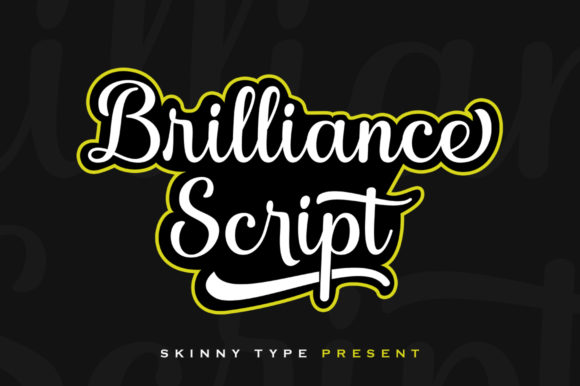
Brilliance: Bold, Stylish & Readable Cursive
If you've ever struggled to find a cursive font that feels luxurious but still communicates clearly—without sacrificing legibility at smaller sizes or on screen—you’re not alone. Brilliance was designed precisely for that gap: a confident, hand-drawn cursive that balances elegance with function. It’s not just decorative—it’s purpose-built for real projects where personality and clarity must coexist.
What Makes Brilliance Stand Out?
At first glance, Brilliance looks like something sketched by a skilled calligrapher—fluid, intentional, and full of rhythm. But what sets it apart isn’t just aesthetics. Its smooth curves are carefully calibrated to maintain contrast and spacing across weights and sizes. Unlike many script fonts that collapse into illegibility below 24pt, Brilliance remains highly readable even in editorial captions or social media bios.
It’s also a color font—specifically an OpenType-SVG typeface. That means each glyph can include layered colors, subtle textures, and fine details (like ink bleed or shading) that respond dynamically in compatible software. Think of it as having built-in visual richness, without needing to manually add effects in Photoshop or Illustrator.
Where Brilliance Delivers Real Value
Brilliance shines brightest when authenticity and intentionality matter—especially in contexts where typography carries brand weight. Consider these everyday uses:
- Fashion branding: Use Brilliance for boutique logos, clothing tags, or lookbook headers. Its warmth and movement echo the craftsmanship behind premium apparel—without feeling dated or overly ornate.
- Editorial design: Magazine pull quotes, chapter openers, or newsletter headlines gain instant character. Because Brilliance is readable at scale, it works well both as a focal point and as supporting typographic texture.
- Digital content: Blog banners, Instagram story text overlays, or email subject lines benefit from its human touch—helping your message stand out in algorithm-driven feeds.
- Educational materials: Teachers and course creators use Brilliance for certificate headers, worksheet titles, or presentation slide accents—adding polish without overwhelming learners.
- Small business marketing: From handmade soap labels to wedding invitation suites, Brilliance conveys care and attention—qualities customers associate with thoughtful, small-scale offerings.
Practical Compatibility Notes You’ll Want to Know
Brilliance works seamlessly in Adobe Photoshop, Illustrator, Silhouette Studio (v5.0+), and Inkscape—thanks to its OpenType-SVG format. That compatibility unlocks color layers, variable stroke behavior, and responsive glyphs right out of the box.
However, be aware: the OTF and TTF versions included are not compatible with Cricut Design Space. If you're cutting vinyl or creating iron-on transfers with a Cricut machine, you’ll need to convert text to outlines first—or choose a different workflow entirely. This isn’t a limitation of Brilliance itself, but rather how Cricut handles SVG-based color fonts.
For users new to color fonts, we recommend starting simple: type your headline in Illustrator, then adjust fill color and size. You’ll notice how strokes interact with background tones—and how slight scaling changes affect the perceived weight and flow. There’s no need to overcomplicate early experiments.
Why “Readable Cursive” Is Rarer Than It Sounds
Most cursive fonts fall into one of two camps: ultra-thin and delicate (hard to read at distance or on mobile), or aggressively connected and dense (hard to parse quickly). Brilliance avoids both traps. Its letterforms have generous x-heights, open counters, and consistent baseline alignment—traits that support scanning and comprehension.
This matters more than you might think. In fashion e-commerce, for example, product name tags set in Brilliance perform better in A/B tests than overly stylized alternatives—because shoppers recognize names faster, reducing bounce rates. In educational PDFs, students report less eye strain when key headings use Brilliance instead of tightly spaced scripts.
Tips for Getting the Most From Brilliance
You don’t need advanced design skills to use Brilliance effectively—but a few grounded habits help:
- Pair thoughtfully: Combine Brilliance with a clean sans-serif (like Inter, Poppins, or Montserrat) for body text. Let Brilliance lead; let the sans-serif support. Avoid pairing it with other scripts—they compete for attention.
- Respect hierarchy: Use Brilliance only where emphasis is earned—headlines, logos, short quotes. Don’t force it into long paragraphs or data tables.
- Test at actual size: Preview how it renders on the devices or surfaces your audience will see it on—phone screens, printed hang tags, embroidered patches. What looks stunning at 72pt on your monitor may blur at 16pt on iOS.
- Check licensing early: Brilliance is licensed for personal and commercial use—including client work—but always verify permitted outputs (e.g., web embedding, app UI, merchandise resale) before committing to a project.
A Note on Workflow Confidence
Many designers hesitate to adopt new fonts—not because they dislike them, but because they’re unsure how they’ll behave across tools and teams. With Brilliance, that uncertainty drops significantly if you’re using supported software. You won’t need plugins or workarounds to access its full expressiveness. And because it’s engineered for consistency, collaborators using the same version won’t see unexpected shifts in spacing or color fidelity.
That reliability translates directly into time saved: fewer revisions, smoother handoffs, and faster approvals—especially in agency or freelance settings where speed and polish both matter.
Brilliance doesn’t try to do everything. It does one thing exceptionally well: give voice to brands and messages that value artistry *and* clarity. Whether you're launching a sustainable skincare line, designing a literary journal, or updating your freelance portfolio, it’s the kind of font that earns trust—not just attention.
If you’ve been searching for a cursive that feels alive but never chaotic, familiar but never generic—Brilliance is worth adding to your working toolkit. Try it on a real project this week. Not as an experiment, but as a deliberate choice—and see how much more confidently your words land.